
This guide walks you through three calls that cover the basics:
- List the latest active ads on a platform
- Paginate through results with a cursor
- Fetch the full detail of a single ad
If you can run these three, you can run anything else in the API.
Base URL
https://api.tryatria.comAll endpoints live under /open/v1/.
Authentication
Every request must include your API key in the X-API-Key header:
X-API-Key: atria-sk_xxxxxxxxxxxxxxxxxxxxxxxxxxxxxxxxAPI keys start with the atria-sk_ prefix. To create one:
- In the Atria web app, click the avatar in the top-left corner.
- Go to Settings & members → API Keys.
- Click Create API key to issue a new key.
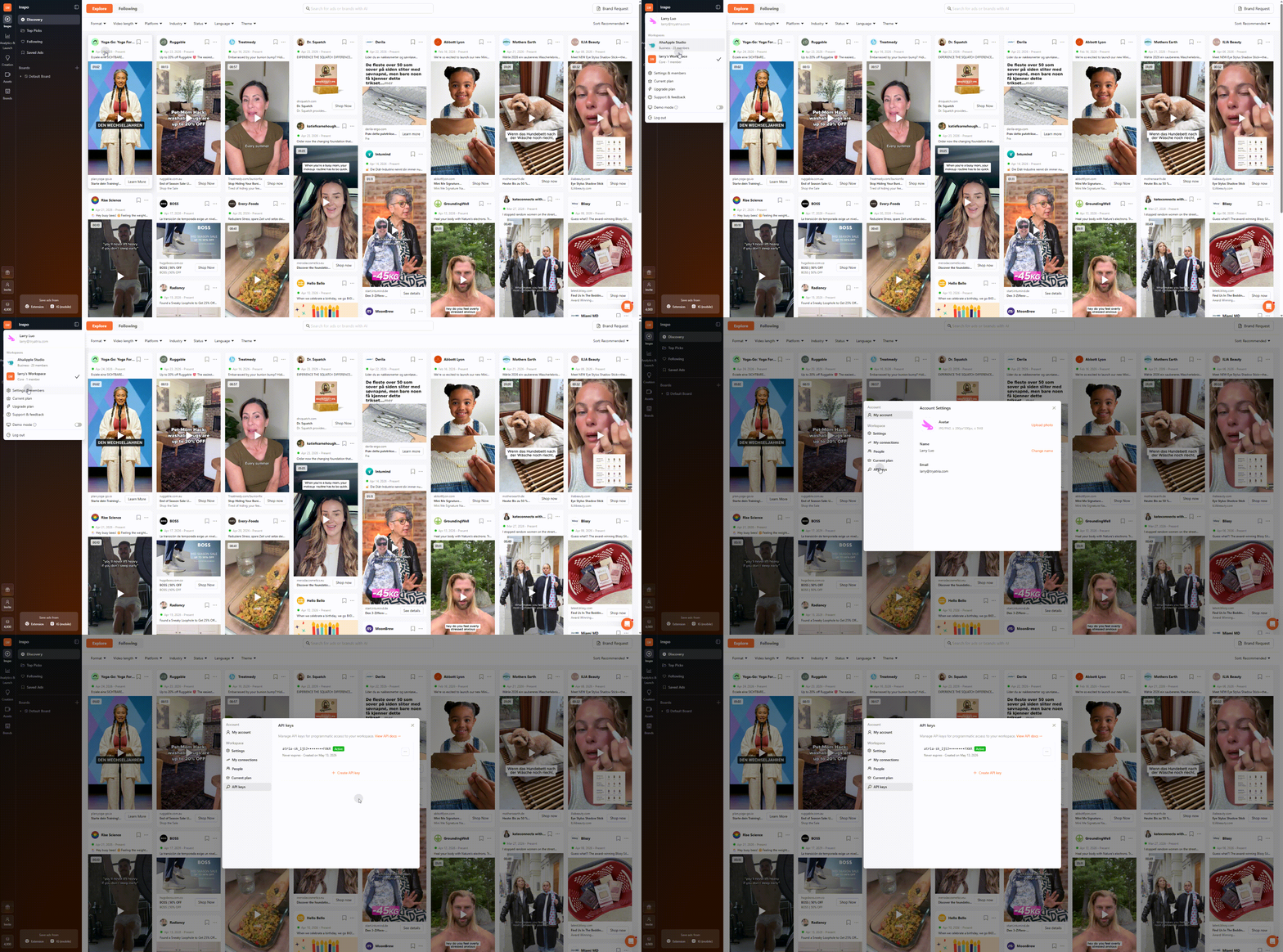
Copy your key immediatelyThe full key is shown only once at creation time — store it in a password manager or secrets vault before closing the modal. If you lose it, you'll need to rotate to a new key.
Each workspace can have up to two active keys.
If the X-API-Key header is missing, the gateway returns 401 with error: "unauthorized":
{
  "error": "unauthorized",
  "message": "No valid credentials provided",
  "request_id": "db254fccc64f0e57f3156b8274620426"
}
If the header is present but the key isn't recognized (unknown, disabled, suspended, or expired), you get 401 with error: "invalid_api_key":
{
  "error": "invalid_api_key",
  "message": "The provided API key is invalid",
  "request_id": "20a3d4af927efade86e6ff9f1cae3ff7"
}
Response envelope
Every successful endpoint returns the same wrapper:
{
  "code": 0,
  "message": "ok",
  "data": { ... }
}
code: 0means success. A non-zerocodeindicates a business-level error — readmessagefor context.- Gateway-level errors (
401,429,5xx) bypass the envelope and return a flat{ error, message, request_id }shape. Always check the HTTP status first.
Example 1 — List recent active ads on Facebook
The most common starting point: fetch the latest active ads, filtered by platform.
curl -sS \
  -H "X-API-Key: $ATRIA_API_KEY" \
"https://api.tryatria.com/open/v1/ads?platform=facebook&status=active&sort_by=newest&page_size=10"import os
import requests
resp = requests.get(
"https://api.tryatria.com/open/v1/ads",
headers={"X-API-Key": os.environ["ATRIA_API_KEY"]},
params={
"platform": "facebook",
"status": "active",
"sort_by": "newest",
"page_size": 10,
},
timeout=30,
)
resp.raise_for_status()
body = resp.json()
assert body["code"] == 0, body["message"]
for ad in body["data"]["items"]:
print(ad["id"], ad["brand_name"], ad["title"])const url = new URL("https://api.tryatria.com/open/v1/ads");
url.searchParams.set("platform", "facebook");
url.searchParams.set("status", "active");
url.searchParams.set("sort_by", "newest");
url.searchParams.set("page_size", "10");
const resp = await fetch(url, {
headers: { "X-API-Key": process.env.ATRIA_API_KEY },
});
if (!resp.ok) throw new Error(`HTTP ${resp.status}`);
const body = await resp.json();
if (body.code !== 0) throw new Error(body.message);
for (const ad of body.data.items) {
console.log(ad.id, ad.brand_name, ad.title);
}A truncated response:
{
  "code": 0,
  "message": "ok",
  "data": {
    "items": [
      {
        "id": "m1234567890123456",
        "ad_id": "m1234567890123456",
        "status": "active",
        "brand_id": "m1234567890123456",
        "brand_name": "Example Brand",
        "brand_avatar_url": "https://cdn.example.com/avatar.png",
        "platforms": ["facebook", "instagram"],
        "display_format": "video",
        "media_format": "video",
        "title": "Discover our new collection",
        "body": "Limited drop — free shipping this weekend.",
        "cta_type": "SHOP_NOW",
        "cta_text": "Shop Now",
        "link_url": "https://example.com/spring",
        "start_date": "2026-05-01",
        "end_date": null,
        "images": [],
        "videos": [
          {
            "url": "https://cdn.example.com/video.mp4",
            "preview_image_url": "https://cdn.example.com/preview.jpg",
            "width": 1080,
            "height": 1080,
            "duration": 18.5
          }
        ],
        "categories": ["shopping", "accessories"]
      }
    ],
    "cursor": "eyJjdCI6MTAsImRnIjoiZWI2OGZjNDY5NjI1MDgzOTg2N2FjZWMuLi4=",
    "total": 0,
    "page_size": 10
  }
}
What to notice:
items[].idis the canonical ad ID — use it for the detail endpoint in Example 3.cursoris an opaque token. Pass it back as-is to get the next page — never try to decode or modify it.totalmay be0or a clamped value; treat cursor pagination as the source of truth for "are there more results."
Example 2 — Paginate with the cursor
Cursor pagination is deterministic and retry-safe: replaying the same cursor against the same query returns the same items, so it's safe to retry on network errors.
Pass the cursor from Example 1 back as a query parameter to fetch page 2:
curl -sS \
  -H "X-API-Key: $ATRIA_API_KEY" \
"https://api.tryatria.com/open/v1/ads?platform=facebook&status=active&sort_by=newest&page_size=10&cursor=$CURSOR"import os
import requests
BASE = "https://api.tryatria.com/open/v1/ads"
headers = {"X-API-Key": os.environ["ATRIA_API_KEY"]}
params = {
"platform": "facebook",
"status": "active",
"sort_by": "newest",
"page_size": 10,
}
cursor = None
for page in range(1, 4): # walk 3 pages
if cursor:
params["cursor"] = cursor
resp = requests.get(BASE, headers=headers, params=params, timeout=30)
resp.raise_for_status()
data = resp.json()["data"]
print(f"page {page}: {len(data['items'])} ads")
cursor = data["cursor"]
if not cursor:
break # last pageconst BASE = "https://api.tryatria.com/open/v1/ads";
const headers = { "X-API-Key": process.env.ATRIA_API_KEY };
const baseParams = {
platform: "facebook",
status: "active",
sort_by: "newest",
page_size: "10",
};
let cursor = null;
for (let page = 1; page <= 3; page++) {
const url = new URL(BASE);
for (const [k, v] of Object.entries(baseParams)) url.searchParams.set(k, v);
if (cursor) url.searchParams.set("cursor", cursor);
const resp = await fetch(url, { headers });
const body = await resp.json();
console.log(`page ${page}: ${body.data.items.length} ads`);
cursor = body.data.cursor;
if (!cursor) break; // last page
}A few things to keep in mind:
- The cursor is opaque — don't parse, decode, or hand-construct it.
page_sizecaps at 250. Values above are silently clamped.- When
cursorisnullin the response, you've reached the last page.
Don't reuse a cursor across different filtersA cursor encodes the query it was issued under. Changing
platform,query,sort_by, etc. and reusing an old cursor returns undefined results. Always start fresh (nocursor) when filters change.
Example 3 — Get an ad's full detail
Once you have an ad ID from the list endpoint, fetch the complete record:
curl -sS \
  -H "X-API-Key: $ATRIA_API_KEY" \
"https://api.tryatria.com/open/v1/ads/m1234567890123456"import os
import requests
ad_id = "m1234567890123456"
resp = requests.get(
f"https://api.tryatria.com/open/v1/ads/{ad_id}",
headers={"X-API-Key": os.environ["ATRIA_API_KEY"]},
timeout=30,
)
resp.raise_for_status()
ad = resp.json()["data"]
print(f"{ad['brand_name']} — {ad['title']}")
print(f" format: {ad['display_format']} status: {ad['status']}")
print(f" copy: {ad['body']!r}")
# Media assets — every ad carries `images[]` and `videos[]`; either or
# both can be empty depending on display_format.
for img in ad["images"]:
print(f" image: {img['url']} ({img['width']}x{img['height']})")
for vid in ad["videos"]:
print(
f" video: {vid['url']} "
f"({vid['duration']}s, preview={vid['preview_image_url']})"
)
if not ad["images"] and not ad["videos"]:
print(" (no media — text-only ad)")const adId = "m1234567890123456";
const resp = await fetch(
`https://api.tryatria.com/open/v1/ads/${adId}`,
{ headers: { "X-API-Key": process.env.ATRIA_API_KEY } },
);
const ad = (await resp.json()).data;
console.log(`${ad.brand_name} — ${ad.title}`);
console.log(` format: ${ad.display_format} status: ${ad.status}`);
console.log(` copy: ${JSON.stringify(ad.body)}`);
// Media assets — every ad carries `images[]` and `videos[]`; either or
// both can be empty depending on display_format.
for (const img of ad.images) {
console.log(` image: ${img.url} (${img.width}x${img.height})`);
}
for (const vid of ad.videos) {
console.log(
` video: ${vid.url} (${vid.duration}s, preview=${vid.preview_image_url})`,
);
}
if (ad.images.length === 0 && ad.videos.length === 0) {
console.log(" (no media — text-only ad)");
}The detail response carries the same shape as one element of data.items from the list endpoint — same field names, same types. The endpoint exists so you can refetch a single ad without re-issuing the list query.
What media to expect
Every ad has images[] and videos[] arrays, but their contents depend on the ad's display_format:
display_format | images[] | videos[] | Notes |
|---|---|---|---|
image | 1 entry | empty | Static creative. |
video | empty | 1 entry | videos[0].preview_image_url is the thumbnail. |
carousel | multiple entries | may also have videos | Cards are flattened — order is preserved. |
dco | varies | varies | Dynamic creative; check both arrays. |
Always iterate both arrays and tolerate empty lists — that one loop covers every case without branching on display_format. Treat display_format as informational, not as a contract on which array will be populated.
If the ad doesn't exist (or isn't visible to your workspace), you get:
{
  "code": 0,
  "message": "ok",
  "data": null
}
Where to go next
- Use cases — composite recipes (competitor research, daily digest, board sync, etc.)
- API reference — every endpoint, parameter, and enum value